This is what 1 hour of saved work per account looks like.
Below is the actual dashboard your founders use each morning, taken from a live client engagement. Every account is pre-researched. Every signal is one click from its source. Every draft is voice-matched and ready to send. Your job is the part only you can do — read it, edit if needed, send.
One screen. Everything you should do today, ranked.
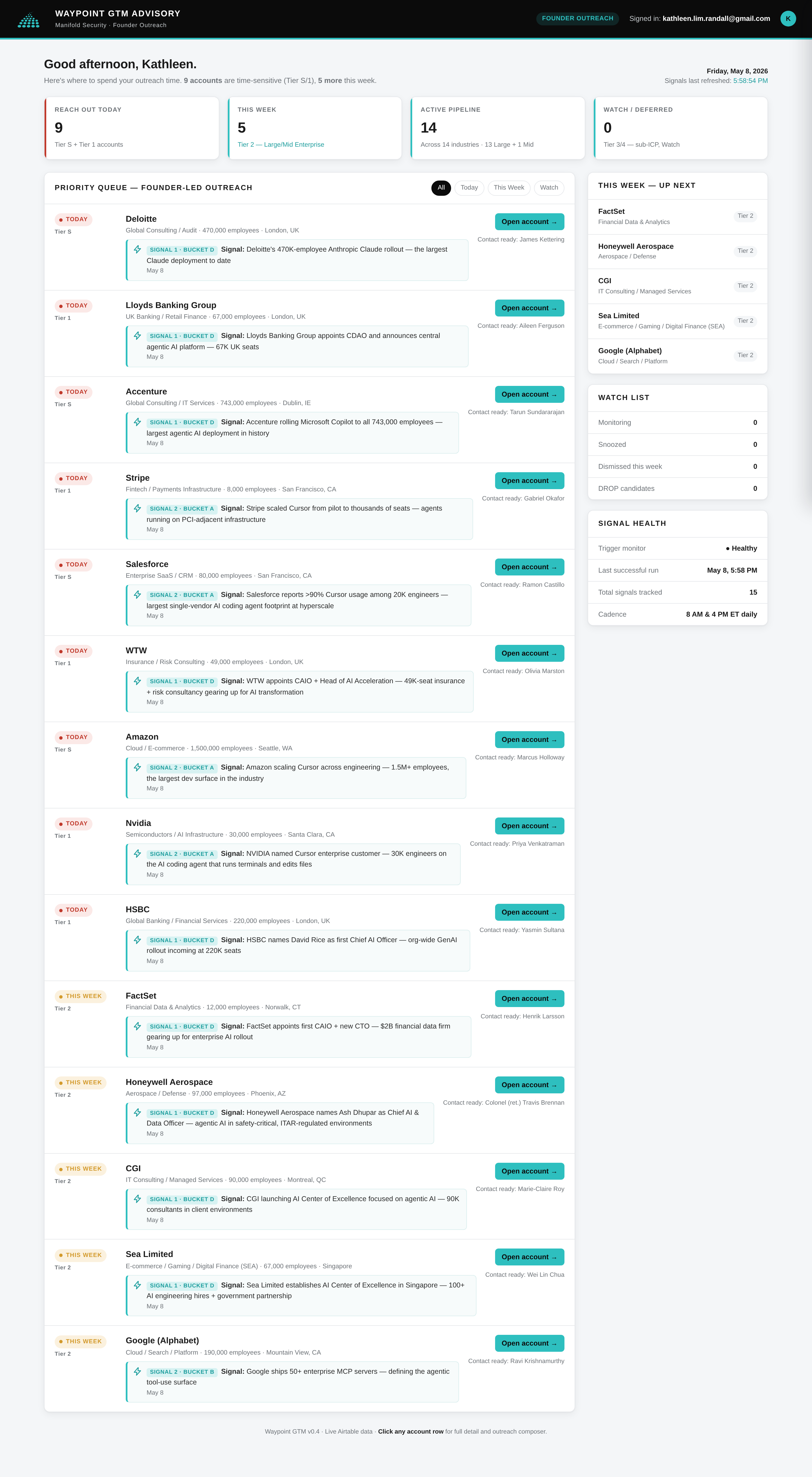
Open the dashboard and the first thing you see is the queue. Accounts are sorted by tier: Tier S at the top (highest-conviction match for your ICP plus a fresh signal), then Tier 1, then Tier 2. KPI strip across the top tells you today's reach-out target, this week's pipeline, and what's parked on watch.
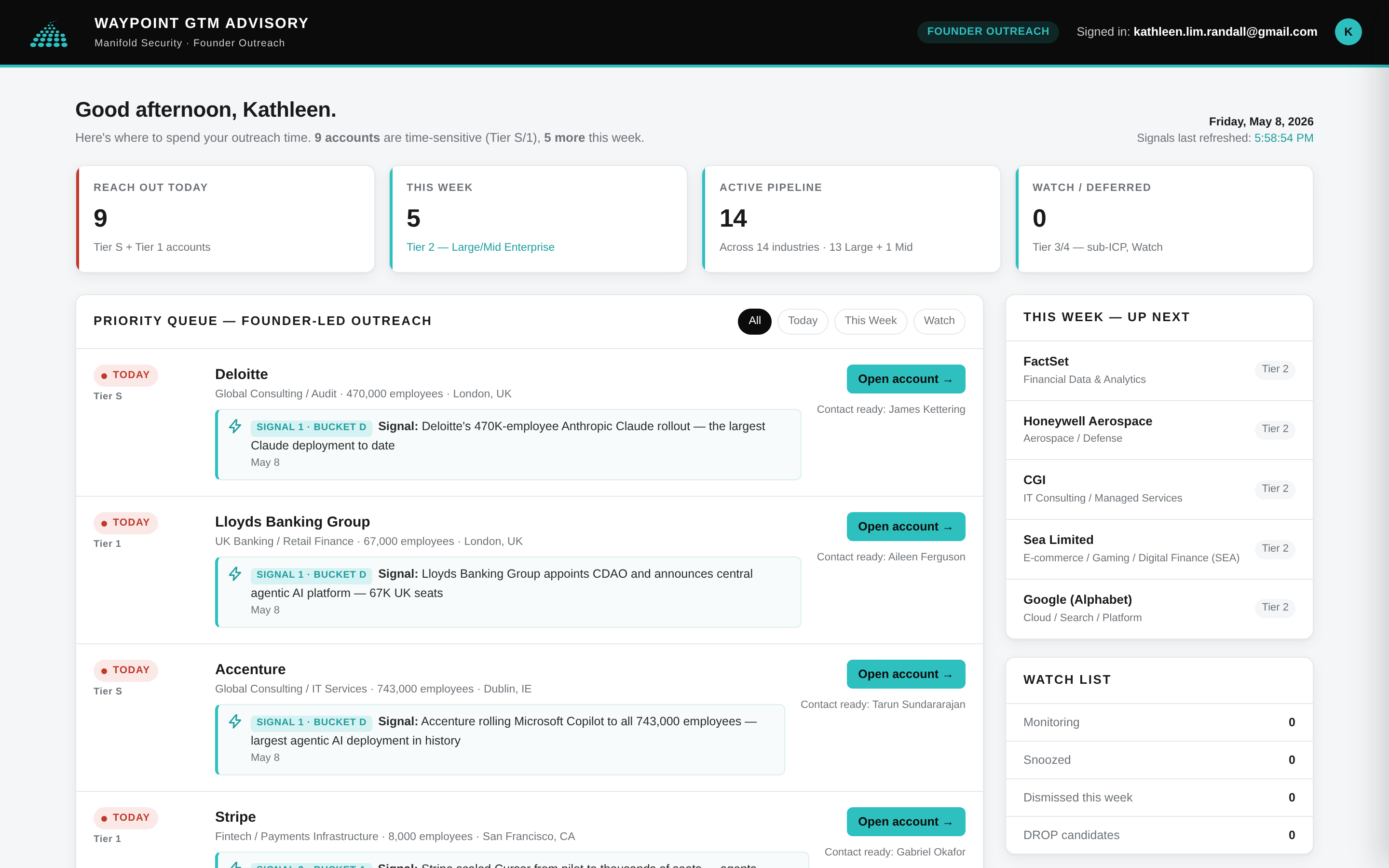
What you're looking at
- KPI strip (top). 9 accounts time-sensitive today. 5 more this week. 14-account active pipeline. 0 on watch — because nothing fell through the cracks.
- Tier badges on each row. Tier S = drop everything. Tier 1 = today. Tier 2 = this week. The signal that drove the tier is one click away.
- Signal bucket pill (e.g., "SIGNAL 1 · BUCKET D"). The buying-cycle stage that signal corresponds to. Bucket D = strategic commitment; Bucket A = active deployment. Buying-stage at a glance.
- Contact already named. "Contact ready: James Kettering" — Clay enrichment ran, the right person is identified, no further hunt required.
- Right rail: This Week — Up Next. Tier 2 accounts queued behind today's. Watch List below for anything snoozed, dismissed, or below tier.
Note what's not here. You didn't have to filter on a CRM, pivot a spreadsheet, or scan a list of 200 companies hoping a winner pops out. The system has already done that for you, this morning, while you slept.
Click any row. Get the full case for the outreach in one panel.
Clicking an account row opens a slide-out drawer with everything you'd otherwise spend 30–45 minutes assembling: the actual signal text with verified source URLs, the suggested primary contact (with LinkedIn, tenure, recent activity), and the firmographics.
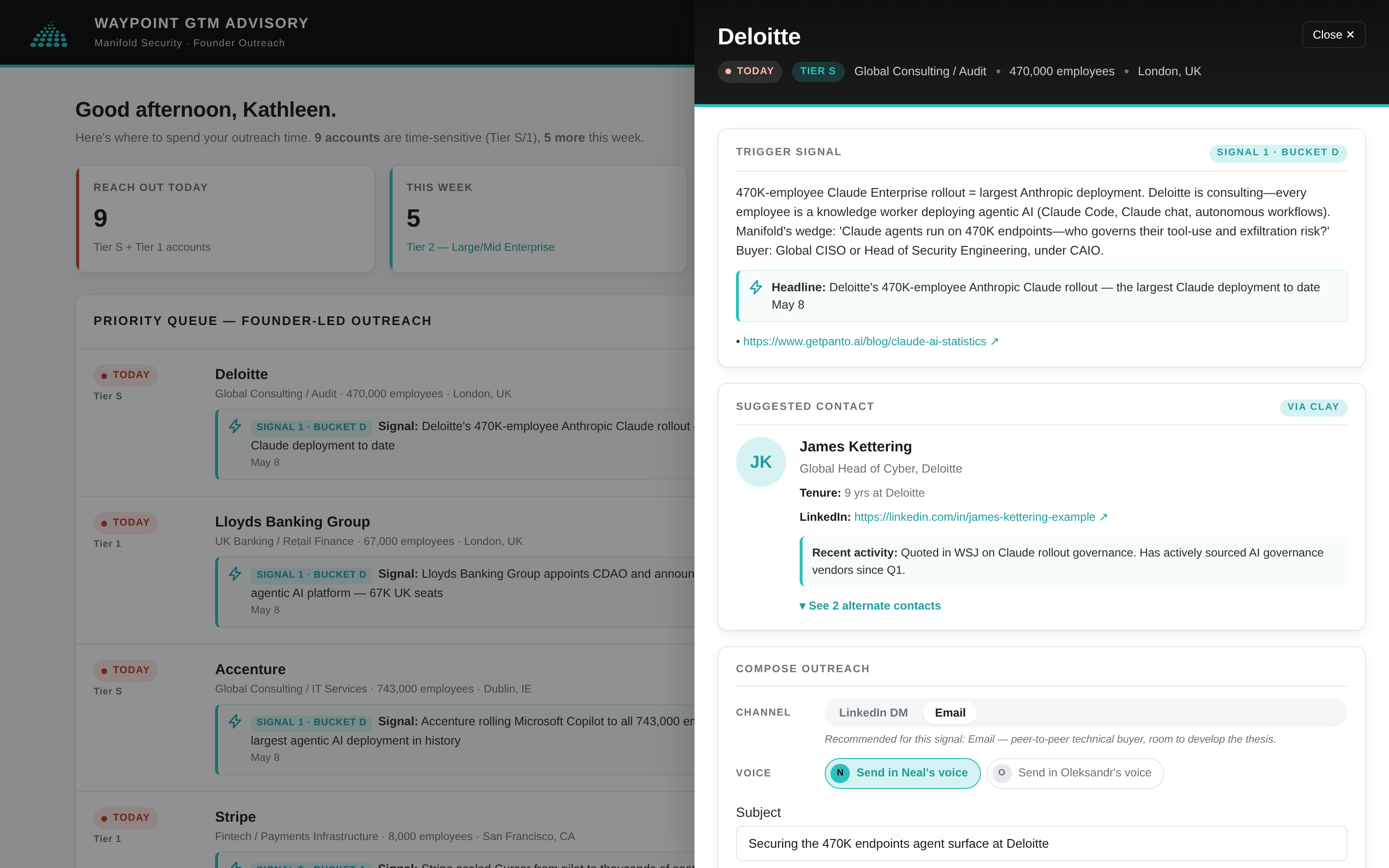
What you're looking at
- Trigger Signal block. The exact pull from the source — a one-paragraph explanation of why this is now, written by the classifier and verified against the source URL. No filler.
- Source URL. Click the link. You land on the public source — earnings transcript, press release, GitHub repo, news article. Every claim in the system is one click from verification.
- Suggested Contact card. Name, title, tenure, LinkedIn URL, and a "Recent activity" line that shows what they've been publicly engaging on. "+ See 3 alternate contacts" expands to the alt-contact list ranked by seniority.
- Compose Outreach (below the fold). Voice toggle, channel toggle, subject, draft message — pre-populated, voice-matched, ready to edit.
The draft is already in your voice. Edit if you want. Otherwise: send.
Scroll down inside the drawer and you hit the compose section. Each account ships with four pre-written drafts — one per voice / channel combination (founder vs. co-founder × email vs. LinkedIn DM). The system picks the recommended combination based on the signal's bucket and the contact's persona, but you can switch with one click and the message reflows.
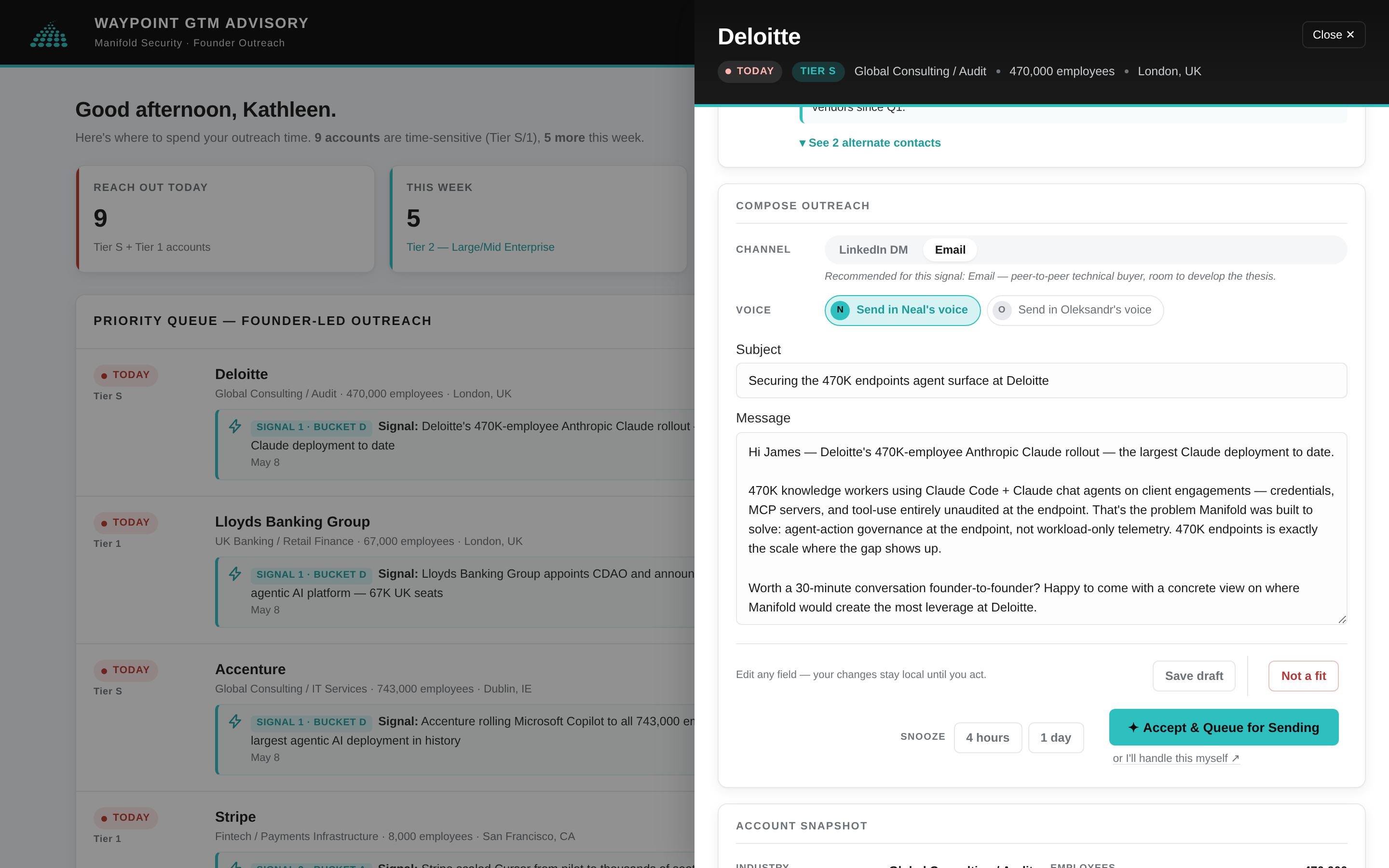
What you're looking at
- Channel toggle (LinkedIn DM / Email). Recommended-channel banner above explains why this one was picked — based on signal context and contact persona.
- Voice chips. Send in your voice, or your co-founder's. The message body reflows when you switch. Voice profiles are built once during Step 1 and used everywhere.
- Subject line + message body. Calibrated PVP — names the specific signal, paraphrases naturally, ties to your wedge, ends in a low-friction ask. Edit inline. Save updates the draft for next time you open this account.
- Action bar (bottom). Four buttons: Save draft, Not a fit, Snooze (4h / 1 day), Accept & Queue for Sending. Plus a small text link: "or I'll handle this myself ↗" for when you're going to fire it directly from your inbox.
Account snapshot. Competitor flags. Everything to make the call.
Below the composer, the drawer continues: firmographics (industry, employees, revenue, HQ), a brief account description, and a list of named competitors — with strategic competitors flagged so you know which threats are actively positioning against you in this account. Every claim is traceable to its underlying public source.
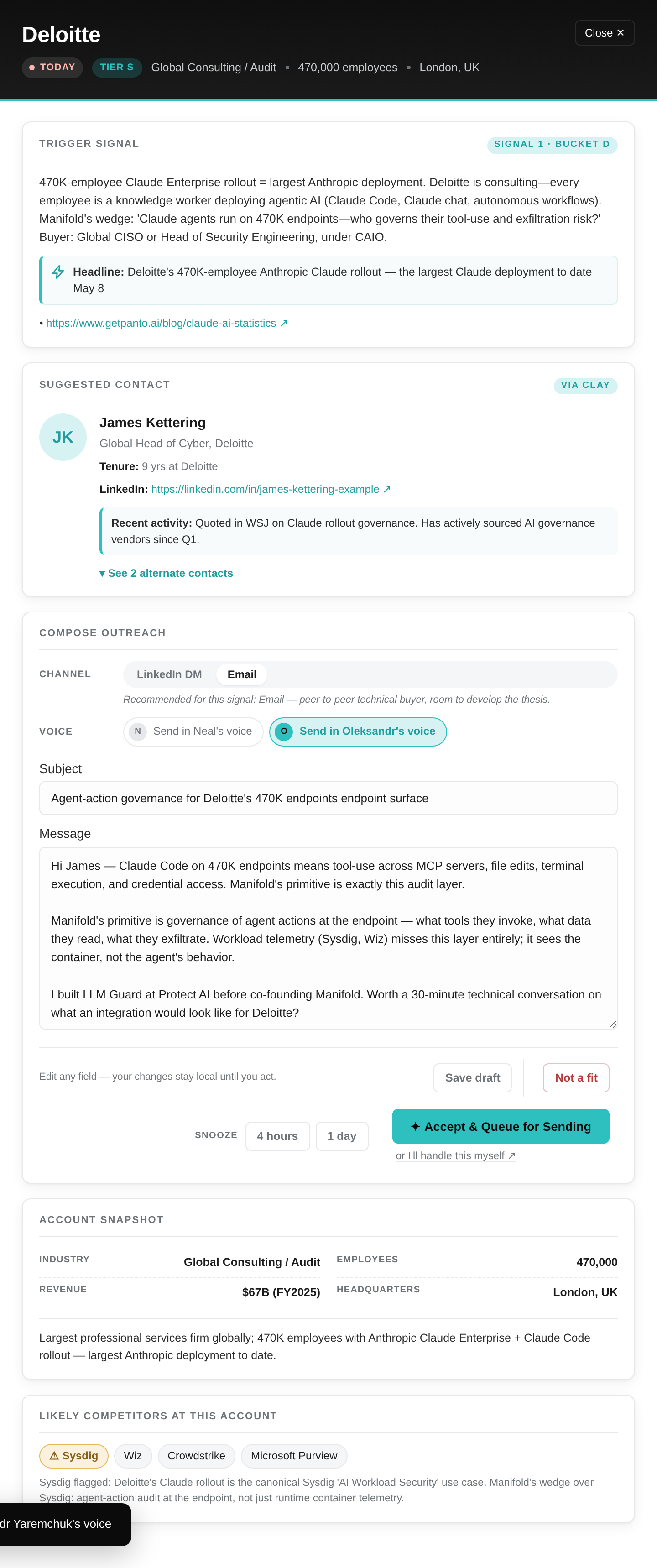
What you're looking at
- Account snapshot. Industry, employee count, revenue, HQ — verified from public sources during signal capture.
- Description. 1–2 sentence summary of what the company does. Useful when you're scanning fast and the company name is unfamiliar.
- Largest competitors. Named explicitly. Strategic competitors (the ones who'd actually fight you for this deal) are flagged separately so you can position against them in the draft.
And here's the whole thing, top to bottom.
For reference, the full single-page view. KPI strip, priority queue, right rail with Up Next / Watch List / Signal Health / Completed Today, and a Not-a-Fit log for accounts you've dismissed (with reason captured). Everything you need on one page; nothing that doesn't earn its real estate.
You stay in the founder seat. The system does the prep.
The dashboard is not a sequencer. It is not an SDR-as-a-service. It is the result of the 1 hour of prep work — per account, per day — that you would otherwise either skip entirely or do badly because it's hour seven of your day.
With this in front of you, the founder action is what it should be: read the signal, decide if it matches your gut, edit the draft if you have a sharper line, hit send. That's the part of outbound only you can do. Everything else, the system handles.